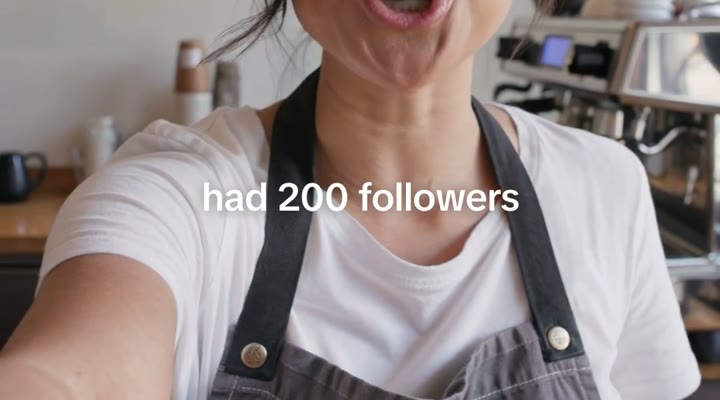
 TikTok Sans · 600 · 2–3 words
Clean auto-captions
Two or three words at a time, white, centred near your mouth. Split where you’d naturally pause, never on a dangling “the”.
Drop in a talking video. Get back a finished reel with clean captions, pop-ups above your head and music that knows its place.
Every reel here was edited by Growth Creator.
You stay the star. Every caption and graphic is there to show exactly what you’re saying, and nothing more.
TikTok Sans · 600 · 2–3 wordsTwo or three words at a time, white, centred near your mouth. Split where you’d naturally pause, never on a dangling “the”.
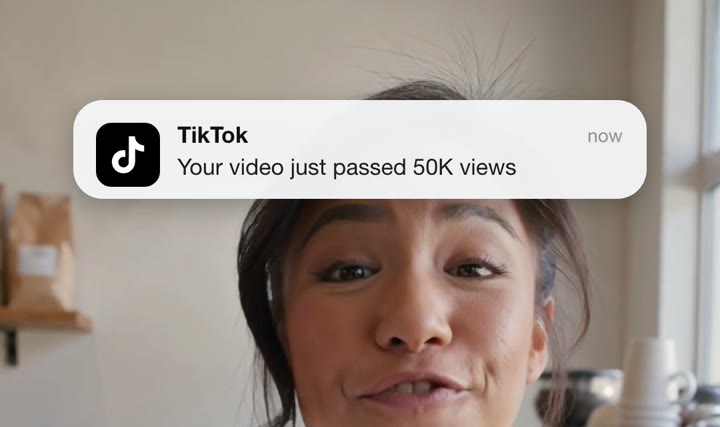
Notifications, an AI that talks back, a big number, a comment call to action. Each one appears on the word that names it.
Nothing lands under the like, comment and share column, the top tabs or your caption. Toggle the zones on while you edit to see for yourself.
Your voice is lifted, the song sits under it, and it drops lower the moment the drums kick in. Add a boom on any word.
Growth Creator listens to it on your computer and writes every word with its exact timing.
Fix any misheard word, keep or change the suggested pop-ups, add music and a boom. The preview updates as you go.
Get a 1080 × 1920 file ready for Reels, TikTok and Shorts. Every claim on screen is yours to check before it goes out.
Most editors upload your footage to someone else’s server. Growth Creator runs a speech model inside your browser and renders the reel there too. We never see your video, and there’s nothing to delete afterwards.
One continuous, vertical take of you talking to camera, up to 3 minutes. Growth Creator captions and decorates your clip. It doesn’t cut it, so trim it first if you need to.
No. Transcription and rendering both happen in your browser, on your own computer. The only download is the speech model, once, about 77 MB.
No. Growth Creator is free and needs no account. A small “Edited with Growth Creator” tag shows for the last two seconds, and you can switch it off before you export.
Chrome, Edge and Safari on a computer. Chrome 126 or newer and Safari save MP4. Older browsers save WebM, which Instagram and TikTok also accept from a computer.
English is the most accurate. Spanish, French, German, Portuguese, Indonesian, Vietnamese and Thai work too, and you can fix any word before you export.
Yes, any song file you have the rights to. Growth Creator finds where the drums come in and drops the music under your voice from there. For chart songs, add them in the Instagram or TikTok app instead, so the platform licenses them.